
Your Data Deserves a Conversation
Stop pasting CSVs into AI chatbots


🎥 Some of this article is also covered in a video on Exploring ChatGPT’s YouTube channel - take a look and subscribe!
There’s a habit that’s become surprisingly common for people who work with data. You export a spreadsheet, open your favourite chatbot, paste the whole thing in, and type something like: “Can you help me make sense of this?”
It works. Claude, ChatGPT and Gemini are good at it. But it’s also a bit like printing out your bank statement to ask your accountant a question, watching them answer, then shredding the printout and doing the whole thing again next week.
You’re starting from zero every time. And that’s a problem worth solving.
Why you shouldn’t “just paste it in”
When you drop raw data into a general-purpose chat, you’re wasting a lot of time (as well as tokens, i.e. energy!):
You have to copy the data manually.
You have to explain the schema, at least to an extent (what the columns mean, what units they’re in, where the numbers came from).
You have to explain to the AI the context and reasons for looking at the data in the first place.
And quite often you won't have visualised the data yourself before asking the AI your questions, which means you could be missing important cues, like peaks and troughs you weren't expecting.
The result is that you deal with an AI that is technically capable but contextually lost. Every answer comes with an asterisk: based on what you pasted, which may or may not be current, complete, or what you actually meant.
There’s a better way, and we’re here to help! (for free)
Embedding AI in your data
First, a fair caveat: if you have a one-off dataset and a one-off question, pasting it into a chat is probably fine. The friction is acceptable for something you’ll never look at again.
But most data worth caring about isn’t like that. It gets updated. And you come back to it weekly, or daily, or every time something changes. Each time you do, you repeat the same setup ritual (re-paste, re-explain, re-verify) and then spend time quality-checking the AI’s answers because you’re never quite sure what context it might be missing.
Think about the dashboards people actually live in: a business performance report that refreshes every Monday, a financial portfolio that moves daily, a weather feed that updates by the hour. In every one of these cases, the data changes but the questions stay roughly the same. And the opportunity is the same too: connect chat capabilities directly to the data source, so the AI is always working from current, correctly-structured information and persistent context rather than whatever you remembered to paste.
The Art of Asking Questions is a reader-supported publication. To support my work, please consider becoming a paid subscriber.
A concrete example: The API Whisperer
To make this tangible, we built a small app called The API Whisperer. The app is deliberately minimal: we’re not trying to impress anyone with the code. What we want to achieve is to show you the pattern as clearly as possible so you can adapt it.
The API Whisperer does four things:
Fetches live weather data for Rome, Italy from the open-meteo API (free, no key required)
Saves the data to two CSV files (one for hourly data, one for daily)
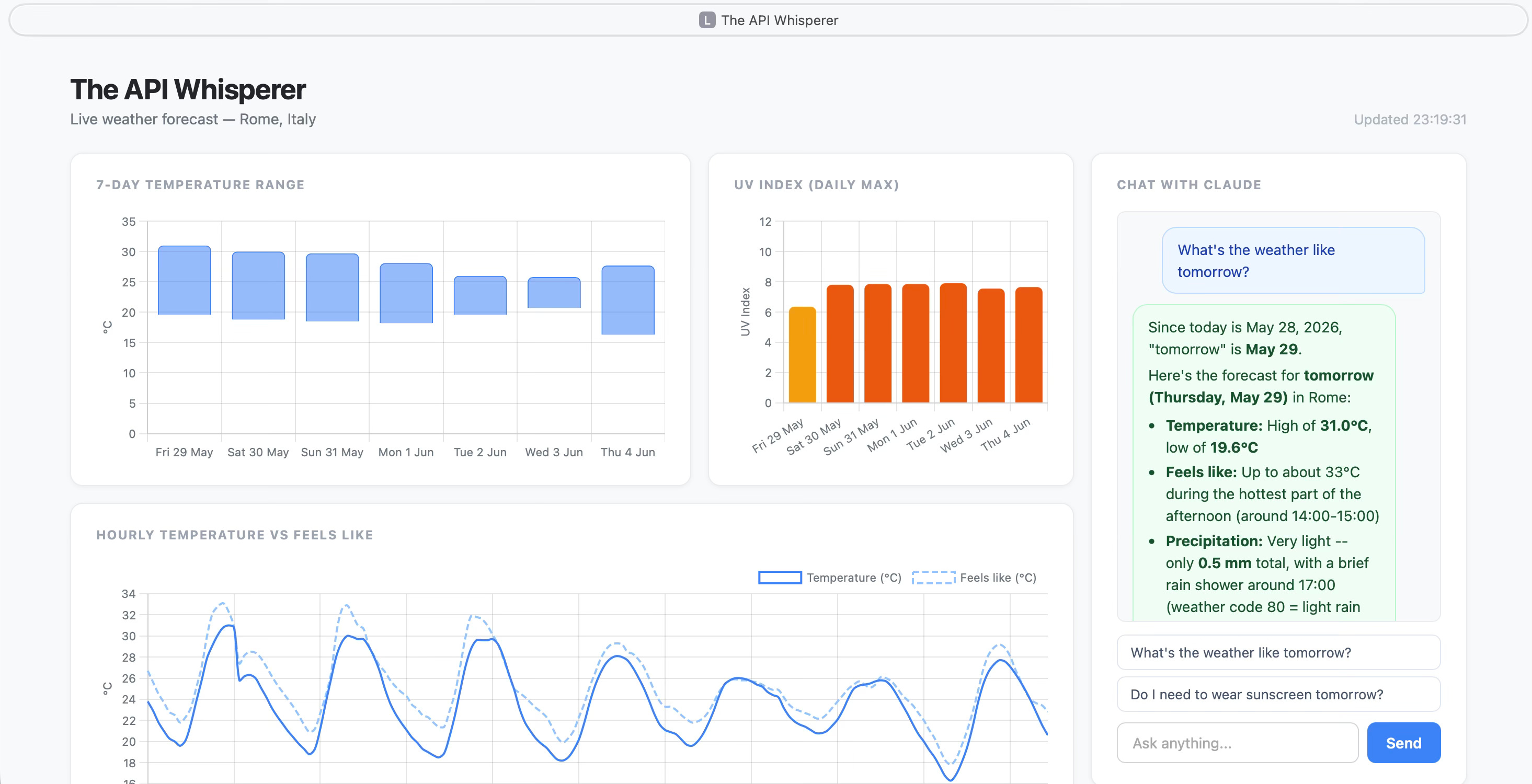
Renders an interactive dashboard with charts: temperature range, UV index, precipitation, wind speed (screenshot below)
Gives you a chat interface powered by Claude Code, positioned right next to the charts
The AI chat functionality reads the documentation, the code, and the data schema on every turn. So when you ask “Do I need sunscreen tomorrow?”, Claude isn’t guessing. It knows the UV index field exists, what scale it’s on, and what today’s date is relative to the forecast data.
The AI can even explain its own code. Ask it “How does the chat work?” and it will walk you through chat.py accurately, because it literally just read it. This is not what you’d do in a production app, as this processes unnecessary tokens - but it’s a great feature in an educational app like this.
One thing worth flagging up front: the chat runs through Claude Code rather than direct API calls, so you'll need this installed and authenticated. That takes a couple of minutes if you haven't done it before, and it means the app costs you nothing beyond your existing Claude subscription (i.e. no per-token billing).
Would you like to hear more about this subject? Check out Exploring ChatGPT’s YouTube channel to watch a full discussion!
The pattern, not the project
The weather example is illustrative, and the pattern is what matters. Swap the data source and you have something completely different:
Replace open-meteo with a finance API and you have a portfolio dashboard where you can ask “How did my holdings perform relative to the S&P this week?”
Replace it with a fitness tracker API and you can ask “Am I sleeping more on days I exercise?”
Replace it with your company’s sales data export and you can ask “Which product line drove Q2 growth?”
In every case, the architecture is the same:
Fetch → Store → Visualise → Chat
The fetch step gets live or recent data. The store step writes it to a simple format (CSV is fine, no database needed for most use cases). The visualise step gives you something to look at and explore. And the chat step connects a language model to all of the above, with the full context baked in.
The AI becomes a layer on top of your data, not a separate tool you consult in isolation.
The barrier is lower than you think
The thing that surprises people about an app like The API Whisperer is how little code it takes. Three Python files. One HTML file for the visuals. No database. No cloud infrastructure. No API key for the weather data.
The Claude integration is a single call, but opportunities are endless.
This simplicity is intentional. The app is designed to be read and understood in an afternoon, then adapted for whatever data you actually care about (and remember that your AI of choice can update it for you).
The key point here is the habit: when you’re working with data that matters to you, give your AI assistant the context it needs to be genuinely useful. Wire it in once. Then just ask.
Technical notes
You can get this setup to work with OpenAI’s offering or a local large language model too. Just download the package from the link below and get your AI of choice to walk you through any required edits.
Note that this was built on Mac - to run on Windows devices, it will need some minimal adaptations. But, once again, your AI of choice will sort that out for you!
Enjoyed this piece? Become a paid member and get my Consulting with AI prompt library, the full Asking Questions Like a Pro course ($199 standalone), practical templates from a decade of fieldwork, and discounts on many other resources. 🔗 See everything included in the paid tier.
 | A guest post by
|
Fantastic work here, thanks so much Andrea! 🔥🔥🔥
Just wondering where the Whisperer idea came from…🤔 (😂)