
Building Your First AI App
No Code Required, Good Questions Essential


I joined Leor from Exploring ChatGPT for a live session where we built two working AI apps from scratch, in front of an audience, in well under an hour. No code, nothing installed, no computer science degree. This article walks you through what we built and how, so you can do the same today. The recording is available on the Exploring ChatGPT YouTube channel, and the (free!) links to both finished apps are below, so you can try them or remix them for yourself.
When I tell people I build AI apps as part of my consulting work, the reaction is fairly predictable. There’s a pause, then some version of “but you don’t code, do you?” And you’d be right to question that, because I don’t! What has changed over the past couple of years and with increasingly sophisticated models is that in-depth knowledge of coding is no longer necessary for a large class of genuinely useful tools (as a footnote, it does matter for many other things!).
There are two ways to build AI apps without writing code yourself:
The first is to have an AI write the code for you, using something like Claude Code, where you describe what you want and watch the machine produce a real software project. That’s powerful, but it still involves code, files, and a certain amount of things that can break. This is what I typically do now, because I need pretty complex applications.
The second way, which is what this article is about, involves no code at all. Everything runs in your browser, you build by clicking and describing, and the whole thing works in minutes. And this is where I started my AI app-building journey!
The tool we used is called PartyRock, made by Amazon. It’s free, and you sign in with an Amazon, Apple or Google account. The way you build apps is by adding widgets to a canvas: places to upload files, boxes for text, AI outputs, chatbots, image generators. Then you wire them together in plain English.
If you can write a decent brief for a colleague, you can build one of these apps. And that, really, is the point we want to make in this article. Whether your app is any good comes down to the same skill I bang on about in almost everything I write here: knowing what you actually want, and asking for it clearly.
App one: An honest job application coach
The first app we built live is one I’d describe as genuinely useful, especially if you’re job hunting right now.
Here’s the everyday problem it aims to solve: you have found a job you want, you have got the ad, your CV, and a covering letter. Normally you would send the lot off and hope to get a call back. What we built instead is a small app that reads all three documents, takes on the role of an honest job application coach, and tells you where you’re strong, where you’re weak and what can realistically be fixed. It then also helps you fix it wherever this is advisable.
The build took a few minutes, which you can watch in the video. The process is very straightforward to follow live, so do have a look if you feel stuck when reading the description that follows.
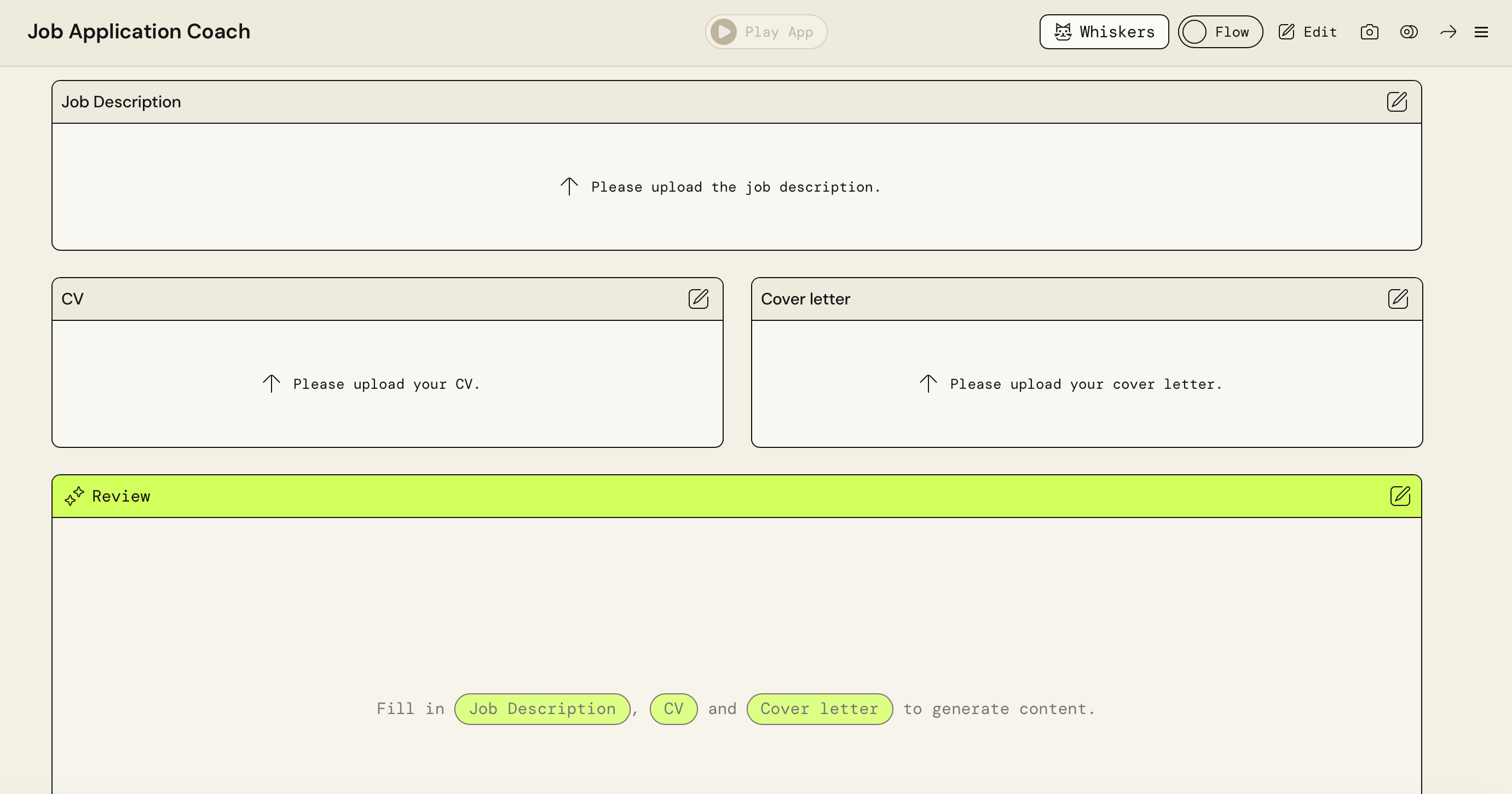
In PartyRock, you start by creating a blank app, then add widgets to the canvas. This is what you need for this specific setup:
Three file-upload widgets, labelled Job Description, CV, and Cover Letter. That’s your input layer.
An AI output widget called Review. This is where the AI functionality lives, and it is based entirely on a straightforward prompt, just like anything you would enter in your favourite chatbot. It begins: “You are an experienced hiring manager reviewing a candidate for a specific role…” - if you visit the app here, you can click the widget and see the whole prompt. The prompt instructs the AI to read the three uploaded documents (you reference other widgets by typing @ and picking them from a list, so the wiring is literally point and click), and to assess the fit. Crucially, it says: be fair but honest, do not flatter, do not be needlessly harsh, base every point on evidence from the documents.
A chatbot widget called Coach, wired to all three documents plus the Review. This gives you a career coach that already knows your situation, so you can ask it things like “rewrite the paragraph about my lack of management experience so it sounds confident but honest” and get a before-and-after with an explanation of what changed.
A second AI output called Competitor Research, which reads the job description, then goes off and finds real, currently operating companies that are competitors or close peers of the employer, with working links and an explanation of why each one is worth studying before an interview. Again, the prompt used can be seen in the app.
Two settings deserve a mention. For the Review widget, we chose Claude Sonnet as the model, switched internet access off, and turned deep thinking on. Why? Because the review should be based purely on the three documents in front of it. We don’t want the web polluting the assessment, and we do want a careful, reliable answer. For the Competitor Research widget, we did the opposite and gave it permission to search the internet, because there the whole point is fresh, real-world information. Neither choice is technical, and both are enabled with a click. These design decisions are the product of asking yourself what a good answer would look like before you ask the machine for one.
When we demoed the app with a test CV and job ad (both AI-generated for the occasion), the app correctly spotted that the profile was too junior for the role, down to details like the candidate having managed a much smaller marketing budget than the £400,000 the job required. Honest, evidenced and considerably more useful than a friend telling you your CV “looks good”.
One caveat Leor raised during the stream is worth bringing up. If you tell the coach that your lack of management experience isn’t really a problem, it will tend to agree with you. AI tools take their cue from how you frame the request, so the honesty of the output depends on the honesty of the input.
Remember: The app checks your work, but it shouldn’t do your thinking. And it certainly shouldn’t write your application for you. You do the work, you put it in for review and you improve it based on the feedback.
App two: A fun trip planner
The second app was lighter, and we built it mainly to show the breadth of what’s possible. You type in a destination and a few notes about your trip. One AI widget, with internet access on, writes a realistic day-by-day itinerary matched to your notes. A second widget then reads that itinerary and paints a vintage-style travel poster to match, mood, highlights and all.
The build was even simpler than the first: two text inputs (Destination, pre-filled with Paris, and Trip Details), one AI output for the itinerary and one image output for the poster. The trip details we used were the sort of thing you’d tell a friend: four days, a couple, love food and markets, a bit of history, relaxed pace, mid-range budget, at least one great viewpoint. The more detail you give it, the better the plan. Again, the quality of the output tracks the quality of the brief.
To switch things up, here’s the image it makes if you ask it to visit Rome instead of Paris (the destination we showed in the live).

What this is good for, and what it isn’t
I use PartyRock apps regularly in my day job, and the reason behind the useful ones is consistent: they shine on highly repeatable tasks, things that always look the same on the way in but need tailored judgement on the way out.
Here are two concrete examples from a consulting setting:
Public-sector clients regularly publish invitations to tender describing what they want. I’ve built an app with a description of what my firm does embedded in it; I upload the invitation to tender, and it tells me whether this is a good fit for us or too far from our typical areas of expertise to be worth bidding on.
Another pattern I rely on is structured extraction: if you’re working through a stack of reports or academic articles and need the same section pulled out of each one, embedding the extraction prompt in an app makes the task reliable and nearly effortless.
It is worth noting that PartyRock comes with a daily usage allowance; I’ve never hit it in normal use, but this isn’t the right tool for a production pipeline or anything at serious scale (for that you’d graduate to Amazon Bedrock, or build something proper with a coding agent).
Also keep in mind that each run starts clean rather than remembering previous sessions, although there’s a neat workaround: a static text widget can hold standing context, such as “I am a consultant working in the field of [X]”, which every other widget can then reference. This offers a degree of permanence without any database in sight.
Two features make these apps unexpectedly social. You can share a snapshot of any result, so a colleague can see, say, a bid assessment exactly as it appeared on your screen (or you can see a proposed itinerary for a trip to Rome - which is where the picture above comes from). And anyone can remix your app: take a copy, change the prompts, and make it their own.
The actual skill
Here’s the reflection we closed the stream with:
You can build something genuinely useful with AI today without writing a line of code, provided you’re clear about what you want.
Look back at what actually determined the quality of those two apps. Deciding that the reviewer should be fair but honest, never flattering. Deciding that the assessment should be sealed off from the internet while the research should be steeped in it. Telling the trip planner that you’re a couple who love food and markets rather than just typing “Paris”.
So our encouragement is this: pick one small, recurring task from your week, open PartyRock, and spend twenty minutes describing the job to a machine as carefully as you’d brief a junior colleague. If the first version disappoints you, the fault will almost certainly be in the brief, and the fix is a better question.
That, in our experience, is the whole game. And the real prize when you finish is confidence: once you’ve watched one app come together in an hour, you’ll find yourself spotting the next three.
Enjoyed this piece? Become a paid member and get my Consulting with AI prompt library, the full Asking Questions Like a Pro course ($199 standalone), practical templates from a decade of fieldwork, and discounts on many other resources. 🔗 See everything included in the paid tier.
 | A guest post by
|